Guide
Datenprodukte mit dbt bauen

Jochen Christ
Co-Founder & CTO, Entropy Data ·
dbt ist eines der beliebtesten Tools für Datentransformation. Hier zeigen wir, wie wir dbt-Projekte als Datenprodukte mit klarer Ownership, Output Ports, Data Contracts und Qualitätstests strukturieren. Und wie wir Coding Agents nutzen, um Datenprodukte automatisch zu implementieren.
Warum dbt für Datenprodukte?
dbt (data build tool) ist ein SQL-first-Transformationsframework, das auf Data Warehouses wie Snowflake, BigQuery, Databricks, AWS Athena und DuckDB läuft. Es bringt Software-Engineering-Best-Practices in die Datenwelt: Versionskontrolle, Modularität, Tests und Dokumentation.
Diese Eigenschaften machen dbt zu einer natürlichen Wahl, um Datenprodukte zu implementieren. Ein dbt-Projekt kann ein Datenprodukt abbilden: klare Inputs, Transformationslogik, Output-Modelle, Tests und Dokumentation, alles in einem Git-Repository, das einem Team gehört.
Mit einem Data Contract starten
Schauen wir uns ein reales Beispiel an: ein Datenprodukt, das wir bei Entropy Data intern im Customer Success nutzen, um zu verstehen, wie unsere Kunden die Anwendung verwenden, und um sie proaktiv beim Aufbau besserer Datenprodukte mit Data Contracts zu unterstützen.
Bevor wir auch nur ein dbt-Modell schreiben, definieren wir zuerst einen Data Contract für das Ziel-Data-Product (genauer: für dessen Output Port). Der Data Contract beschreibt, welche Daten du bereitstellen wirst, Schema, Qualitätsgarantien und Nutzungsbedingungen. Stell dir das wie das Anforderungsdokument für unser Datenprodukt vor.
Indem wir den Contract zuerst entwerfen, einigen wir uns auf das, was tatsächlich gebraucht wird, bevor wir Zeit in die Implementierung investieren. Das hält das Datenprodukt klein und handhabbar. Dieser Contract-First-Ansatz vermeidet Datensätze, die niemand nutzt oder die unsere Erwartungen nicht erfüllen.
Der Data Contract wird im ODCS-Format geschrieben und liegt neben der SQL, die er steuert, unter models/output_ports/v1/:
# models/output_ports/v1/entropydata-customer-activity-v1.odcs.yaml

apiVersion: v3.1.0
kind: DataContract

id: entropydata-customer-activity-v1
name: Customer Activity
version: 1.0.0
status: draft

description:
  usage: analytics
  purpose: Customer activity within Entropy Data for customer success.

schema:
- name: customer_activity
  physicalType: table
  properties:
    - name: organization_id
      description: Unique identifier of the organization.
      logicalType: string
      required: true
      primaryKey: true
      examples:
        - 550e8400-e29b-41d4-a716-446655440000
    - name: organization_vanity_url
      description: Vanity URL of the organization.
      logicalType: string
      examples:
        - acme-corp
    - name: organization_created_by
      description: Email address of the user that created the organization.
      logicalType: string
      examples:
        - admin@acme.com
    - name: organization_created_at
      description: Timestamp when the organization was created.
      logicalType: timestamp
      examples:
        - "2024-03-15T10:00:00Z"
    - name: users_total
      description: Total number of users in the organization.
      logicalType: integer
      required: true
      examples:
        - 12
    - name: users_added_30d
      description: Number of users added in the last 30 days.
      logicalType: integer
      required: true
      examples:
        - 3
    - name: users_last_signed_up_at
      description: Timestamp when the last user signed up.
      logicalType: timestamp
      examples:
        - "2024-09-10T14:22:00Z"
    - name: dataproducts_total
      description: Total number of data products in the organization.
      logicalType: integer
      required: true
      examples:
        - 42
    - name: dataproducts_added_30d
      description: Number of data products added in the last 30 days.
      logicalType: integer
      required: true
      examples:
        - 5
    - name: dataproducts_outputports_total
      description: Total number of output ports across all data products.
      logicalType: integer
      required: true
      examples:
        - 58
    - name: dataproducts_outputports_with_datacontract_percentage
      description: Percentage of output ports that have an active data contract.
      logicalType: number
      required: true
      examples:
        - 72.5
    - name: dataproducts_outputports_with_testresults_percentage
      description: Percentage of output ports that have test results.
      logicalType: number
      required: true
      examples:
        - 65.0
    - name: dataproducts_last_updated_at
      description: Timestamp when the last data product was updated.
      logicalType: timestamp
      examples:
        - "2024-09-14T09:30:00Z"
    - name: assets_total
      description: Total number of assets in the organization.
      logicalType: integer
      required: true
      examples:
        - 87
    - name: data_platform
      description: The data contract / output port type used for most data products.
      logicalType: string
      examples:
        - bigquery
        - snowflake
        - s3
    - name: updated_at
      description: Timestamp when this record was written by the dbt execution.
      logicalType: timestamp
      required: true
      examples:
        - "2024-09-16T06:05:23Z"

team:
  name: customer-success

servers:
  - server: production
    type: databricks
    catalog: entropy_data_prod
    schema: dp_entropydata_customer_activity_v1

roles:
  - role: customer_success
    access: read
Ein Datenprodukt, das dieser Spezifikation entspricht, würde unserem Customer-Success-Team helfen, die Aktivität eines Kunden zu erfassen und schnell Informationen über die Zieldatenplattform des Kunden zu liefern.
In Entropy Data kann der Data Contract über den Data Contract Editor bearbeitet und verwaltet werden:
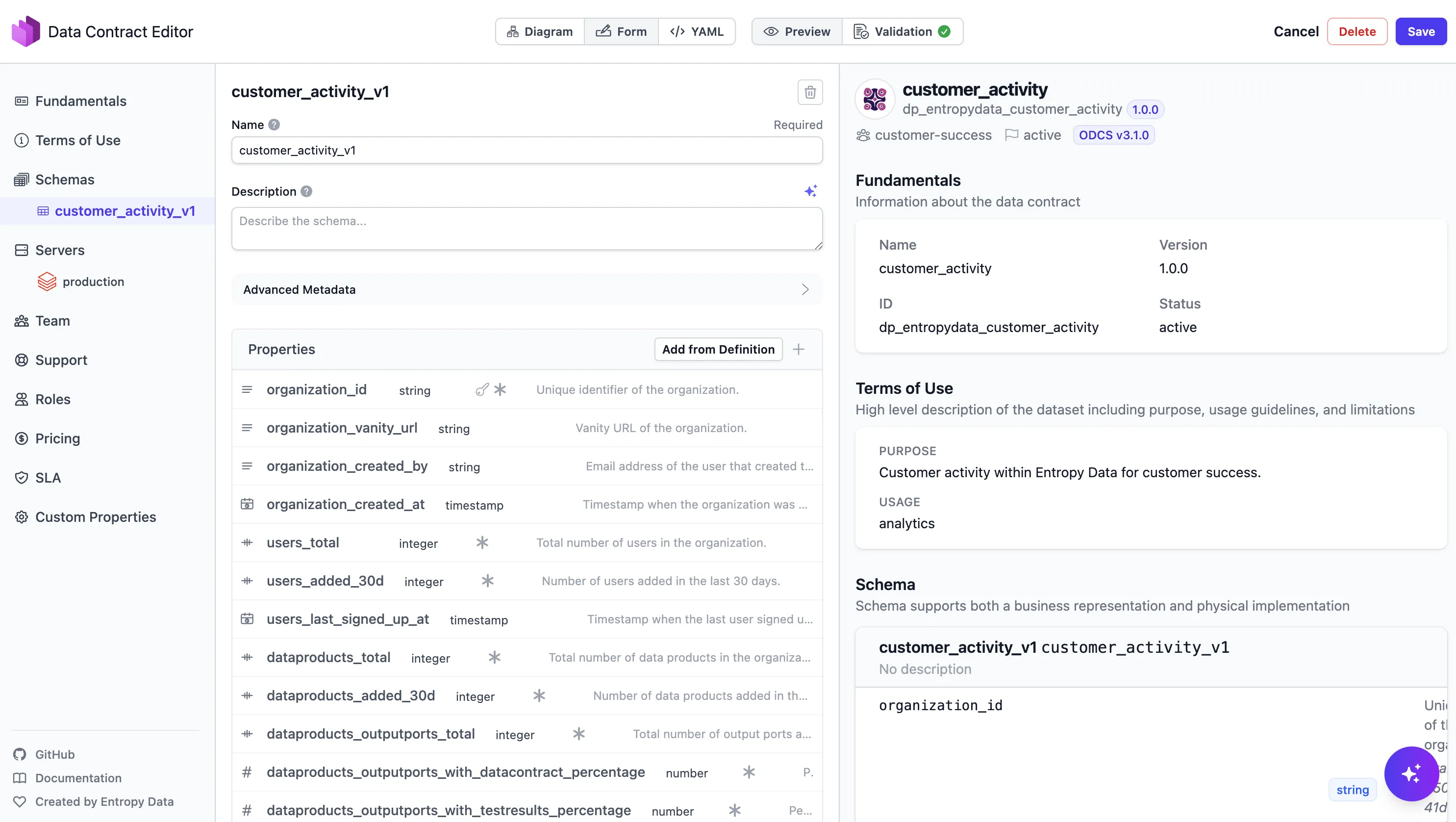
Mit dem Contract in der Hand wird die dbt-Implementierung geradlinig: Bau die Modelle, die den Contract erfüllen.
Datenprodukt-Design
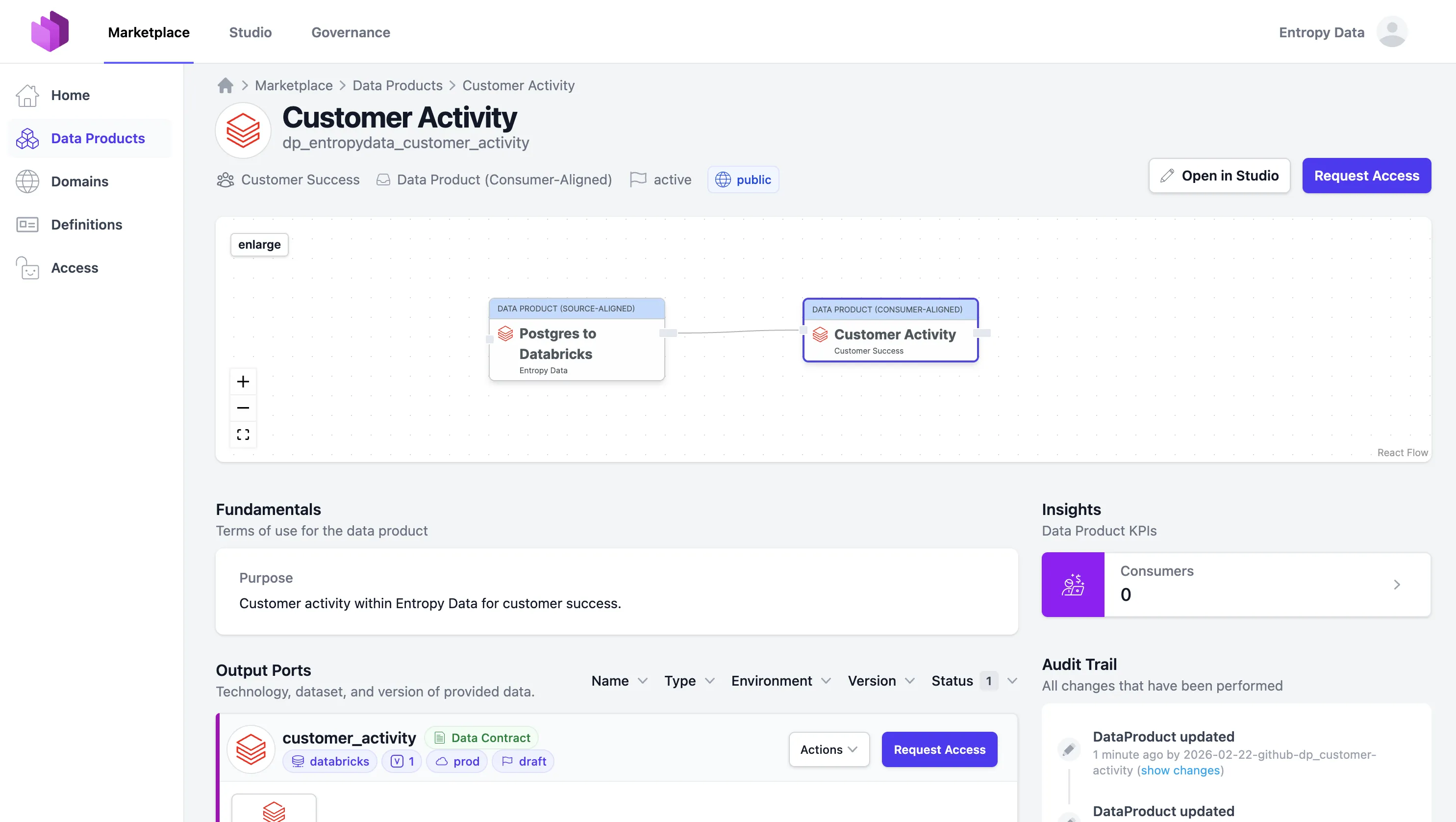
Unser Customer-Activity-Data-Product ist ein consumer-aligned Datenprodukt: Es nimmt rohe operative Daten, transformiert sie und liefert sie für einen spezifischen Use Case: Customer Success.
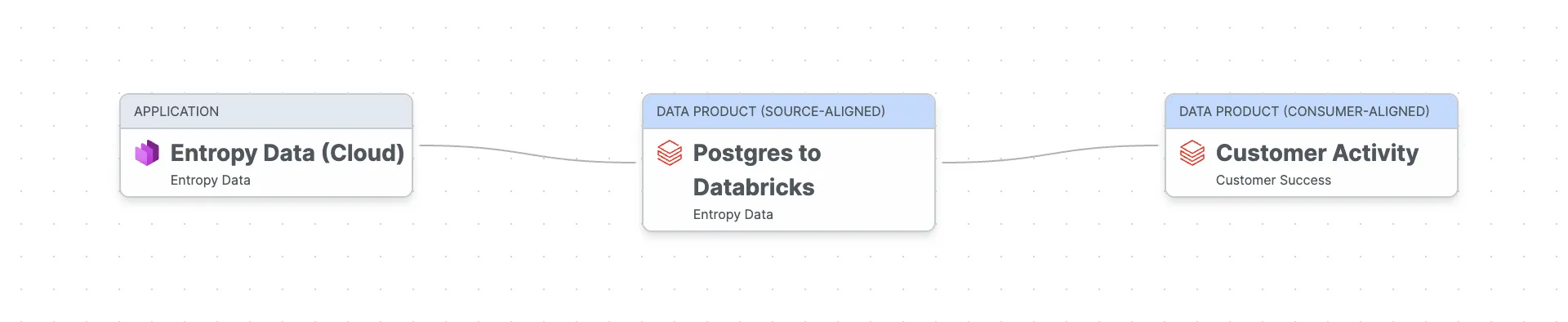
Die Daten fließen von unserer Entropy-Data-Cloud-Anwendung (der operativen Postgres-Datenbank) durch ein source-aligned Raw-Data-Product, das Daten von Postgres nach Databricks extrahiert (per dlt), in das Customer-Activity-Data-Product, das wir nun mit dbt bauen wollen.
Ein dbt-Projekt pro Datenprodukt
Unsere Empfehlung: ein dbt-Projekt pro Datenprodukt. Jedes Projekt gehört einem Team und lebt in seinem eigenen Git-Repository, sodass jedes Datenprodukt unabhängig implementiert und deployed werden kann, eine Best Practice, die wir aus Self-contained Systems mitgenommen haben. Das sorgt für klare Ownership und Autonomie, Kernprinzipien von Data Mesh.
Eine typische dbt-Datenprodukt-Projektstruktur sieht so aus:
dp_entropydata_customer_activity/
├── dbt_project.yml
├── dp_entropydata_customer_activity.odps.yaml      # Data product spec (ODPS)
├── openlineage.yml                                 # OpenLineage transport config
├── profiles.yml.example
├── .github/workflows/data-product.yml              # CI: build, test, publish
├── models/
│   ├── input_ports/                                # External sources this product reads from
│   │   ├── _models.yml
│   │   ├── <provider-output-port-id>.source.yaml   # One file per active access agreement
│   │   └── <provider-output-port-id>.odcs.yaml     # Cached snapshot of upstream contract
│   ├── staging/                                    # Internal: 1:1 cleaned views over input ports
│   │   ├── _models.yml
│   │   ├── stg_organizations.sql
│   │   ├── stg_members.sql
│   │   ├── stg_data_products.sql
│   │   └── stg_assets.sql
│   ├── intermediate/                               # Internal: joined/shaped views with business logic
│   │   ├── _models.yml
│   │   └── int_customer_activity.sql
│   └── output_ports/v1/                            # Public: versioned output port models
│       ├── _models.yml
│       ├── customer_activity.sql
│       └── entropydata-customer-activity-v1.odcs.yaml   # Data contract (ODCS), colocated with the SQL
├── tests/                                          # Custom data tests
│   └── assert_users_total_non_negative.sql
├── analyses/
├── macros/
├── seeds/
└── snapshots/
Die Kernidee: input_ports/, staging/ und intermediate/-Modelle sind intern zum Datenprodukt.
Nur die output_ports/-Modelle sind die öffentliche Schnittstelle, die andere Teams konsumieren.
Output Ports werden versioniert (v1/, v2/, ...), und der ODCS-Contract liegt im selben Verzeichnis wie das SQL-Modell, das ihn implementiert. Der Contract lebt also direkt neben dem Code, den er steuert.
Dieses Layout pflegen wir als Set von Coding-Agent-Skills im dataproduct-builder-dbt-Plugin, sodass Claude Code, Codex oder Copilot CLI ein neues Projekt scaffolden, Modelle aus einem Data Contract generieren und alles mit Entropy Data synchronisieren können.
Output Ports als dbt-Modelle
Output-Port-Modelle werden meist als SQL Views oder materialisierte Tabellen implementiert, die als stabile API des Datenprodukts dienen. Sie abstrahieren die interne Staging- und Transformationslogik und erlauben, die Implementierung zu ändern, ohne Consumers zu beeinträchtigen.
Statt dbt-Modelldefinitionen von Hand zu schreiben, kann die Data Contract CLI sie direkt aus dem Data Contract generieren:
datacontract export dbt-models --output models/output_ports/v1/_models.yml models/output_ports/v1/entropydata-customer-activity-v1.odcs.yamlDas erzeugt die dbt-Modell-YAML mit Spalten, Beschreibungen und Datentypen:
# models/output_ports/v1/_models.yml (generated)

version: 2

models:
  - name: customer_activity
    description: Customer activity within Entropy Data for customer success.
    config:
      meta:
        data_contract:
          id: entropydata-customer-activity-v1
          file: models/output_ports/v1/entropydata-customer-activity-v1.odcs.yaml
        owner: customer-success
      materialized: table
      contract:
        enforced: true
    columns:
      - name: organization_id
        description: Unique identifier of the organization.
        data_type: STRING
        constraints:
          - type: not_null
          - type: unique
      - name: organization_vanity_url
        description: Vanity URL of the organization.
        data_type: STRING
      - name: organization_created_by
        description: Email address of the user that created the organization.
        data_type: STRING
      - name: organization_created_at
        description: Timestamp when the organization was created.
        data_type: TIMESTAMP
      - name: users_total
        description: Total number of users in the organization.
        data_type: BIGINT
        constraints:
          - type: not_null
      - name: users_added_30d
        description: Number of users added in the last 30 days.
        data_type: BIGINT
        constraints:
          - type: not_null
      - name: users_last_signed_up_at
        description: Timestamp when the last user signed up.
        data_type: TIMESTAMP
      - name: dataproducts_total
        description: Total number of data products in the organization.
        data_type: BIGINT
        constraints:
          - type: not_null
      - name: dataproducts_added_30d
        description: Number of data products added in the last 30 days.
        data_type: BIGINT
        constraints:
          - type: not_null
      - name: dataproducts_outputports_total
        description: Total number of output ports across all data products.
        data_type: BIGINT
        constraints:
          - type: not_null
      - name: dataproducts_outputports_with_datacontract_percentage
        description: Percentage of output ports that have an active data contract.
        data_type: DOUBLE
        constraints:
          - type: not_null
      - name: dataproducts_outputports_with_testresults_percentage
        description: Percentage of output ports that have test results.
        data_type: DOUBLE
        constraints:
          - type: not_null
      - name: dataproducts_last_updated_at
        description: Timestamp when the last data product was updated.
        data_type: TIMESTAMP
      - name: assets_total
        description: Total number of assets in the organization.
        data_type: BIGINT
        constraints:
          - type: not_null
      - name: data_platform
        description: The data contract / output port type used for most data products.
        data_type: STRING
      - name: updated_at
        description: Timestamp when this record was written by the dbt execution.
        data_type: TIMESTAMP
        constraints:
- type: not_nullImplementiere als Nächstes die eigentliche SQL-Transformationslogik für jedes Output-Modell:
-- models/output_ports/v1/customer_activity.sql
-- Governed by entropydata-customer-activity-v1.odcs.yaml (ODCS id: entropydata-customer-activity-v1)

{{ config(
    materialized='table',
    schema='op_v1'
) }}

select
    organization_id,
    organization_vanity_url,
    organization_created_by,
    organization_created_at,
    users_total,
    users_added_30d,
    users_last_signed_up_at,
    dataproducts_total,
    dataproducts_added_30d,
    dataproducts_outputports_total,
    dataproducts_outputports_with_datacontract_percentage,
    dataproducts_outputports_with_testresults_percentage,
    dataproducts_last_updated_at,
    assets_total,
    data_platform
from {{ ref('int_customer_activity') }}
Input Ports
Ein Datenprodukt konsumiert typischerweise Daten aus operativen Systemen oder anderen Datenprodukte. In unserem Datenprodukt nutzen wir Daten, die per dlt aus unserer operativen Postgres-Datenbank in ein Raw- bzw. source-aligned Datenprodukt auf der Datenplattform (Databricks) extrahiert wurden.
In dbt werden Inputs als Sources modelliert.
Jeder aktive Data Contract, den wir konsumieren, wird zu einer Datei in models/input_ports/, benannt nach der Output-Port-ID des Anbieters.
Daneben cachen wir den ODCS-Contract des Upstream-Anbieters als Trust-Snapshot, sodass git log zeigt, wann sich ein Upstream-Schema oder eine Quality Rule unter uns geändert hat:
# models/input_ports/op_entropydata_postgres.source.yaml

version: 2

sources:
  - name: dp_entropydata_postgres_op_entropydata_postgres
    description: Operational database of the Entropy Data platform, extracted to Databricks via dlt.
    database: entropy_data_prod
    schema: entropydata_postgres
    config:
      meta:
        data_contract:
          id: entropydata-postgres-v1
          file: models/input_ports/op_entropydata_postgres.odcs.yaml
    tables:
      - name: organization
      - name: organization_member
      - name: data_product
      - name: asset
Das sources[].name kombiniert <provider-data-product-id>_<provider-output-port-id>, sodass zwei Agreements mit demselben Anbieter, aber unterschiedlichen Output Ports nie kollidieren.
Die gecachte op_entropydata_postgres.odcs.yaml liegt neben der Source-Datei und wird durch erneutes Ausführen von entropy-data datacontracts get aktualisiert, nie von Hand bearbeitet.
Transformation
Zwischen Input und Output erledigen die internen Modelle die Transformationsarbeit mit der Business-Logik. Sie sind nicht für Consumers sichtbar.
Staging-Modelle bereinigen und normalisieren rohe Source-Daten: dedupliziert auf die neueste Version, Typen casten, Spalten umbenennen.
-- models/staging/stg_organizations.sql

with source as (
    select *,
        row_number() over (partition by organization_id order by version desc) as _row_num
    from {{ source('dp_entropydata_postgres_op_entropydata_postgres', 'organization') }}
)

select
    organization_id,
    vanity_url as organization_vanity_url,
    created_by as organization_created_by,
    cast(created_at as timestamp) as organization_created_at
from source
where _row_num = 1
-- models/staging/stg_members.sql
with source as (
select *,
row_number() over (partition by organization_member_id order by version desc) as _row_num
from {{ source('dp_entropydata_postgres_op_entropydata_postgres', 'organization_member') }}
)
select
organization_member_id,
organization_id,
user_id,
role,
cast(created_at as timestamp) as created_at
from source
where _row_num = 1-- models/staging/stg_data_products.sql
with source as (
select *,
row_number() over (partition by data_product_id order by version desc) as _row_num
from {{ source('dp_entropydata_postgres_op_entropydata_postgres', 'data_product') }}
)
select
data_product_id,
organization_id,
name,
status,
specification_type,
cast(created_at as timestamp) as created_at,
cast(updated_at as timestamp) as updated_at
from source
where _row_num = 1Intermediate-Modelle wenden Business-Logik an: Tabellen joinen, mit Stammdaten anreichern, abgeleitete Felder berechnen.
-- models/intermediate/int_customer_activity.sql

with members_per_org as (
    select
        organization_id,
        count(*) as users_total,
        count(case when created_at >= date_sub(current_date(), 30) then 1 end) as users_added_30d,
        max(created_at) as users_last_signed_up_at
    from {{ ref('stg_members') }}
    group by organization_id
),

data_products_per_org as (
    select
        organization_id,
        count(*) as dataproducts_total,
        count(case when created_at >= date_sub(current_date(), 30) then 1 end) as dataproducts_added_30d,
        -- TODO: add output_port source table to compute these metrics
        cast(0 as bigint) as dataproducts_outputports_total,
        cast(0 as double) as dataproducts_outputports_with_datacontract_percentage,
        cast(0 as double) as dataproducts_outputports_with_testresults_percentage,
        max(updated_at) as dataproducts_last_updated_at,
        first(specification_type) as data_platform
    from {{ ref('stg_data_products') }}
    group by organization_id
),

assets_per_org as (
    select
        organization_id,
        count(*) as assets_total
    from {{ ref('stg_assets') }}
    group by organization_id
)

select
    o.organization_id,
    o.organization_vanity_url,
    o.organization_created_by,
    o.organization_created_at,
    coalesce(m.users_total, 0) as users_total,
    coalesce(m.users_added_30d, 0) as users_added_30d,
    m.users_last_signed_up_at,
    coalesce(dp.dataproducts_total, 0) as dataproducts_total,
    coalesce(dp.dataproducts_added_30d, 0) as dataproducts_added_30d,
    coalesce(dp.dataproducts_outputports_total, 0) as dataproducts_outputports_total,
    coalesce(dp.dataproducts_outputports_with_datacontract_percentage, 0) as dataproducts_outputports_with_datacontract_percentage,
    coalesce(dp.dataproducts_outputports_with_testresults_percentage, 0) as dataproducts_outputports_with_testresults_percentage,
    dp.dataproducts_last_updated_at,
    coalesce(a.assets_total, 0) as assets_total,
    dp.data_platform
from {{ ref('stg_organizations') }} o
left join members_per_org m on o.organization_id = m.organization_id
left join data_products_per_org dp on o.organization_id = dp.organization_id
left join assets_per_org a on o.organization_id = a.organization_id
Das Datenprodukt bauen
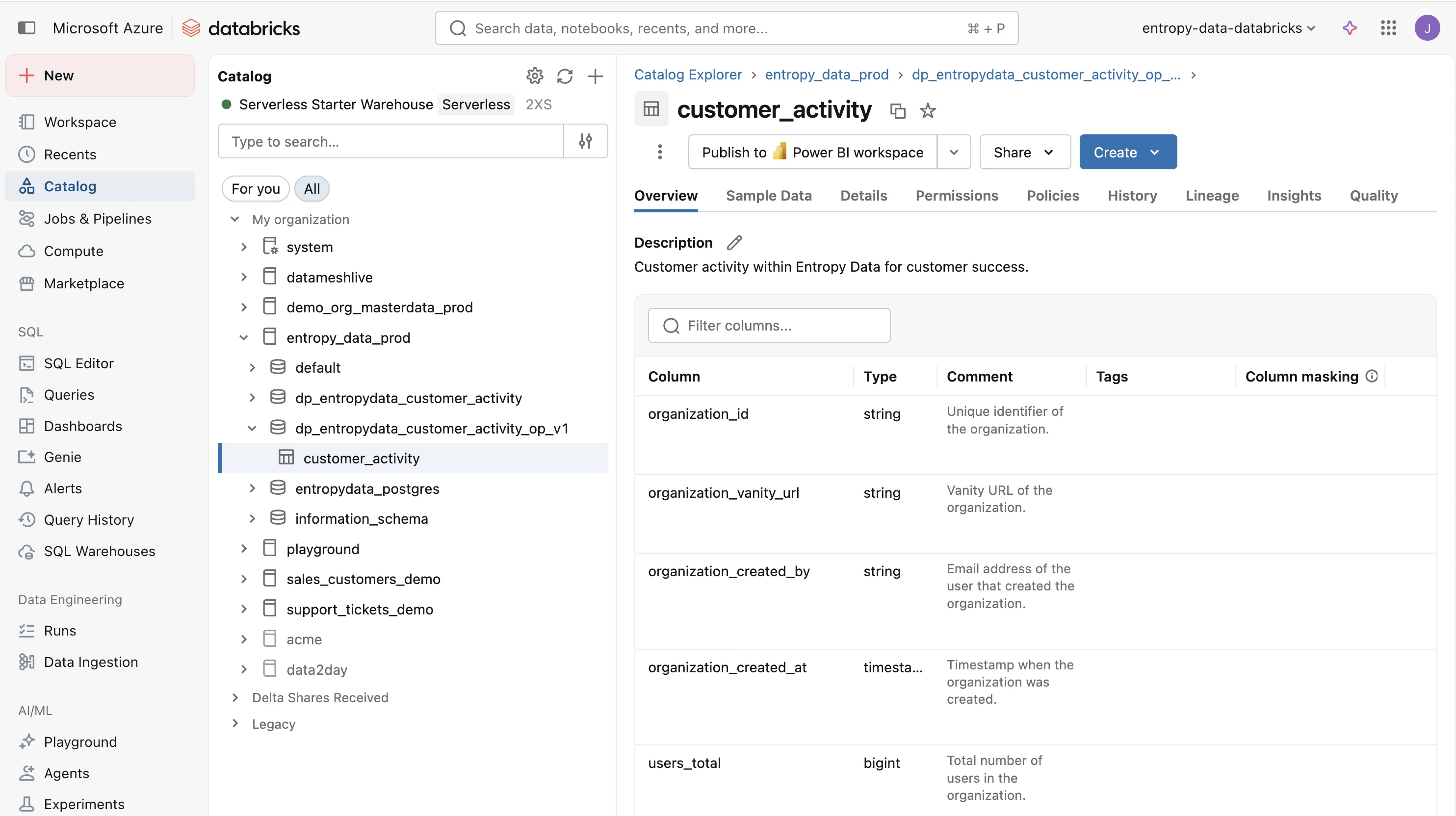
Wenn wir dbt run ausführen, materialisiert dbt alle Modelle und erstellt die Output-Tabelle auf Databricks.
Das Ergebnis ist eine customer_activity-Tabelle im Schema dp_entropydata_customer_activity_op_v1, bereit zur Nutzung durch das Customer-Success-Team.
Testing
Tests sind das, was aus einem dbt-Projekt ein vertrauenswürdiges Datenprodukt macht. Ohne Tests haben Consumers keinen Grund, den Daten zu vertrauen. Sie bauen eigene Checks, duplizieren Logik oder vermeiden das Datenprodukt ganz. Automatisierte Tests machen Qualität sichtbar und geben Consumer die Sicherheit, dass die Daten, auf die sie sich verlassen, korrekt und vollständig sind.
Ein Datenprodukt testen wir auf zwei Ebenen: Unit-Tests verifizieren die interne Implementierung, Contract-Tests verifizieren den Output aus Sicht der Consumers.
Unit Testing
dbt-Tests verifizieren einzelne Schritte entlang der Datenpipeline. Sie sind eng an die Implementierung gekoppelt und ändern sich mit den dbt-Modellen.
Schema-Tests werden in den YAML-Dateien deklariert und validieren not_null, unique, accepted_values und Beziehungen auf jedem Modell.
Custom Data Tests sind SQL-Queries im tests/-Ordner, die Geschäftsregeln prüfen:
-- tests/assert_users_total_non_negative.sql

select organization_id
from {{ ref('customer_activity') }}
where users_total < 0
Liefert die Query Zeilen, schlägt der Test fehl.
dbt Contracts (seit dbt 1.5) erzwingen zusätzlich Spaltennamen und Datentypen zur Build-Zeit.
Das generierte dbt-Modell enthält bereits contract.enforced: true.
Contract Testing
Die Data Contract CLI testet den Output Port aus Sicht der Consumers gegen den Data Contract. Das ist ein Akzeptanztest: Er verbindet sich mit der echten Datenplattform, queryt die Output-Tabellen und prüft Schema, Row Counts und Qualitätsregeln aus dem Contract.
datacontract test models/output_ports/v1/entropydata-customer-activity-v1.odcs.yaml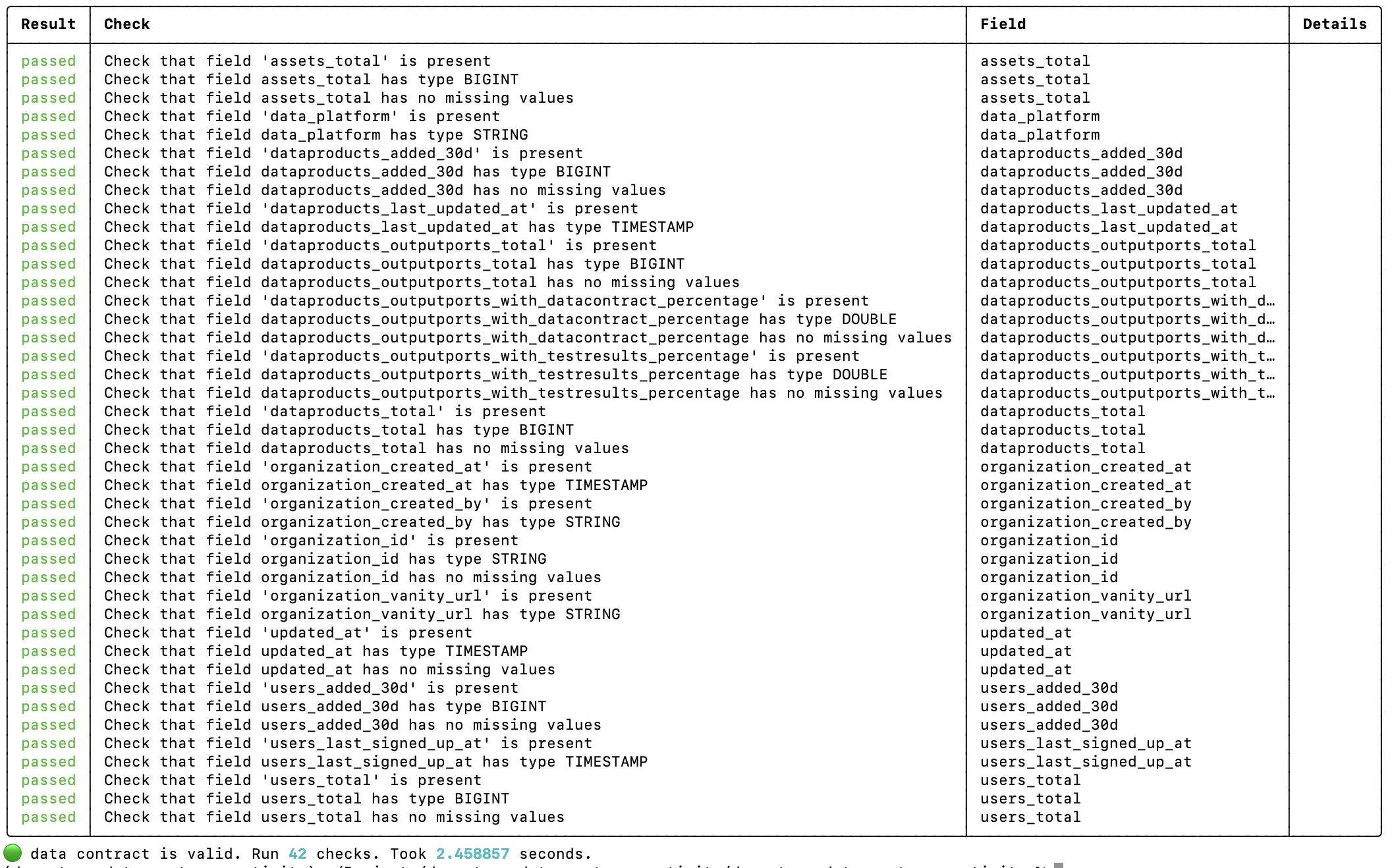
Contract-Tests sind stabiler als dbt-Tests. Sie ändern sich nicht, wenn du interne Staging- oder Intermediate-Modelle refactorst. Solange der Output Port den Contract erfüllt, gehen die Tests durch. Damit eignen sie sich ideal für CI/CD-Pipelines und um Vertrauen bei den Consumern aufzubauen.
Lineage mit OpenLineage
Der OpenLineage-dbt-Wrapper (dbt-ol) sendet Lineage-Events am Ende jedes dbt-Runs.
Entropy Data nimmt diese Events auf und rendert einen interaktiven Lineage-Graphen auf der Datenprodukt-Seite, mit allen Flüssen von Rohinput-Tabellen über Staging und Intermediate bis zu den Output-Modellen.
Konfiguriere den Transport in einer openlineage.yml im Projekt-Root und kodier die Data-Product- und Output-Port-IDs als Query-Parameter auf dem endpoint:
# openlineage.yml

transport:
  type: http
  url: https://api.entropy-data.com
  endpoint: api/v1/lineage?dataProductId=dp_entropydata_customer_activity&outputPortId=customer_activity
  auth:
    type: api_key
Der apiKey wird bewusst aus der Datei weggelassen (er lässt sich nicht aus Environment-Variablen templaten) und wird zur Laufzeit über OPENLINEAGE__TRANSPORT__AUTH__APIKEY injected, sodass das Secret nie im Source Control landet.
CI/CD-Pipeline
Jedes Datenprodukt hat seine eigene CI/CD-Pipeline, die bei jedem Push und periodisch läuft:
dbt-ol runmaterialisiert alle Modelle und sendet OpenLineage-Events an Entropy Datadbt testführt alle Schema- und Custom-Data-Tests aus- Datenprodukt und Data Contract werden in Entropy Data publiziert
datacontract testführt Contract-Tests gegen den Output Port aus
Dafür nutzen wir einen GitHub-Actions-Workflow:
# .github/workflows/data-product.yml

name: Customer Activity Data Product
on:
  push:
    branches: [main]
  schedule:
    - cron: "0 6 * * *"

env:
  API: https://api.entropy-data.com/api
  DBT_DATABRICKS_HOST: ${{ secrets.DBT_DATABRICKS_HOST }}
  DBT_DATABRICKS_HTTP_PATH: ${{ secrets.DBT_DATABRICKS_HTTP_PATH }}
  DBT_DATABRICKS_TOKEN: ${{ secrets.DBT_DATABRICKS_TOKEN }}
  DATACONTRACT_DATABRICKS_TOKEN: ${{ secrets.DBT_DATABRICKS_TOKEN }}
  DATACONTRACT_DATABRICKS_SERVER_HOSTNAME: ${{ secrets.DBT_DATABRICKS_HOST }}
  DATACONTRACT_DATABRICKS_HTTP_PATH: ${{ secrets.DBT_DATABRICKS_HTTP_PATH }}

jobs:
  build:
    runs-on: ubuntu-latest
    steps:
      - uses: actions/checkout@v4

      - name: Set up Python
        uses: actions/setup-python@v5
        with:
          python-version: '3.12'

      - name: Install dependencies
        run: pip install dbt-databricks openlineage-dbt datacontract-cli[databricks] entropy-data

      - name: Create profiles.yml
        run: |
          mkdir -p ~/.dbt
          cat > ~/.dbt/profiles.yml <<EOF
          dp_entropydata_customer_activity:
            target: prod
            outputs:
              prod:
                type: databricks
                catalog: entropy_data_prod
                schema: dp_entropydata_customer_activity
                host: ${DBT_DATABRICKS_HOST}
                http_path: ${DBT_DATABRICKS_HTTP_PATH}
                token: ${DBT_DATABRICKS_TOKEN}
                threads: 4
          EOF

      - name: dbt deps
        run: dbt deps

      - name: dbt run
        run: dbt-ol run --target prod
        env:
          OPENLINEAGE__TRANSPORT__AUTH__APIKEY: ${{ secrets.ENTROPY_DATA_API_KEY }}

      - name: dbt test
        run: dbt test --target prod

      - name: Publish data product
        run: entropy-data dataproducts put dp_entropydata_customer_activity --file dp_entropydata_customer_activity.odps.yaml
        env:
          ENTROPY_DATA_API_KEY: ${{ secrets.ENTROPY_DATA_API_KEY }}

      - name: Publish data contract
        run: entropy-data datacontracts put entropydata-customer-activity-v1 --file models/output_ports/v1/entropydata-customer-activity-v1.odcs.yaml
        env:
          ENTROPY_DATA_API_KEY: ${{ secrets.ENTROPY_DATA_API_KEY }}

      - name: Data contract test
        run: |
          datacontract test models/output_ports/v1/entropydata-customer-activity-v1.odcs.yaml \
            --server production \
            --publish $API/test-results
        env:
          ENTROPY_DATA_API_KEY: ${{ secrets.ENTROPY_DATA_API_KEY }}
dbt-ol run materialisiert die Modelle und schickt OpenLineage-Events an Entropy Data; dbt test führt die Unit-Tests aus.
Anschließend werden die Data-Product- und Data-Contract-Metadaten mit der entropy-data-CLI publiziert, die die REST-API der Plattform kapselt und den API-Key aus der Environment-Variable ENTROPY_DATA_API_KEY liest.
Zum Schluss validiert datacontract test den Output Port aus Sicht der Consumers.
Entropy Data
Entropy Data ist ein Datenprodukt-Marktplatz, der Datenprodukte, Data Contracts und Access Requests verwaltet. Es integriert sich gut, um die komplette Datenprodukt-Experience bereitzustellen:
- Discovery: Consumers finden Datenprodukte in einem Self-Service-Marktplatz
- Access Management: Consumers beantragen Zugriff, Freigaben können RBAC-Provisioning auf der Datenplattform auslösen
- Governance: Ownership, Qualität und Lineage über alle Datenprodukte hinweg
So sieht unser Customer-Activity-Data-Product im Entropy-Data-Marktplatz aus:
Mit dem Data Product Builder Coding Agents nutzen
Die komplette Struktur, die in diesem Artikel beschrieben ist (vom dbt-Projektlayout über die Input- und Output-Port-Contracts bis zum CI-Workflow und zum Lineage- und Test-Publishing), lässt sich automatisch mit dem Data Product Builder generieren.
Starte mit einem Data Contract. Übergib ihn an Claude Code, OpenAI Codex oder die GitHub Copilot CLI. Der Agent scaffoldet genau dieses dbt-Projekt, füllt die Modelle, setzt die Tests auf, konfiguriert den Deployment-Workflow und verdrahtet die Entropy-Data-Integration. Die Struktur bleibt anpassbar: Wenn du Airflow statt GitHub Actions bevorzugst oder andere Namenskonventionen willst, forke das Template, und der Agent nutzt deinen Fork.
Diese Seite erklärt, was dieses Scaffolding produziert, wie die einzelnen Teile zusammenpassen und wie du es für die Konventionen deiner Organisation erweiterst.
Business Value
Mit diesem Datenprodukt kann unser Customer-Success-Team (das sind eigentlich unsere Co-Founder ...) jetzt direkt auf Databricks die customer_activity-Tabelle queryen, um das Engagement jedes Kunden zu verstehen:
wie viele User sie haben, ob sie aktiv Datenprodukte anlegen und welche Datenplattform sie nutzen.
Das ermöglicht proaktives Outreach auf Kunden, die hochskalieren, frühe Erkennung inaktiver Accounts und eine datengetriebene Priorisierung der Support-Arbeit.
Es unterstützt CRM-Aktivitäten und KI-Agenten, die proaktiv erkennen, wo wir Kunden helfen können, bessere Datenprodukte zu bauen oder Integrationen aufzusetzen.
Der Data Contract garantiert Schema und Qualität, sodass sich Dashboards, Agenten und Automatisierungen mit Vertrauen darauf aufsetzen lassen.
Jetzt kostenlos registrieren oder die klickbare Demo von Entropy Data erkunden.
Über den Autor
Jochen Christ
LinkedIn von Jochen ChristCo-Founder & CTO, Entropy Data
Jochen baut Tools, die Daten, Menschen und KI zusammenarbeiten lassen. Er ist Autor der Website Data Mesh Architecture, Maintainer der Data Contract CLI und TSC-Mitglied im Bitol-Projekt der Linux Foundation, der Heimat des Open Data Contract Standard.